The Challenge
As part of my Cloud Computing course final project, my team and I were tasked with designing a cloud architecture for a REST API application. The catch? We had a strict budget of 1 million rupiah per month (approximately $65 USD).
The application was a simple Flask-based REST API for managing orders, with endpoints for creating, reading, updating, and deleting orders. It used MongoDB as the database, and the payloads were relatively small—perfect for a lightweight, scalable solution.
Why Azure Container Apps?
After analyzing the requirements, we realized that traditional Virtual Machines would be too expensive for our budget. Instead, we chose Azure Container Apps for several key reasons:
- Free Credits: We leveraged Azure's $200 free credit through GitHub Student Developer Pack (GitHub Pro), which made it perfect for our academic project
- Cost Efficiency: Pay only for what you use, with automatic scaling
- Resource Optimization: Better utilization compared to standalone VMs
- Auto-scaling: Built-in Kubernetes integration allows automatic horizontal scaling
- Simplified Management: Less overhead than managing VMs directly
Architecture Overview
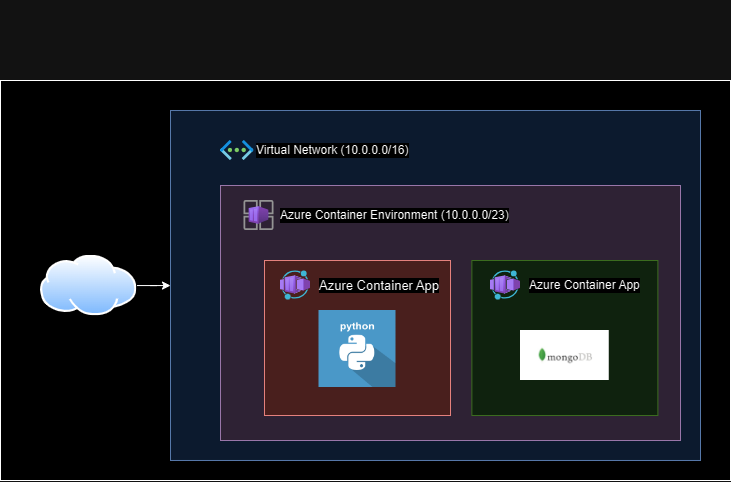
Our architecture consisted of:
- Container Registry: For storing Docker images
- Container App Environment: Shared environment for our services
- MongoDB Container App: Database service with persistent storage
- Flask Container App: REST API service with auto-scaling
- Virtual Network: For secure communication between services
- File Share: Persistent storage for MongoDB data
Key Implementation Steps
1. Setting Up the Infrastructure
We started by creating a resource group to organize all our Azure resources. Then we set up:
- Container Registry with admin user enabled for easy image management
- Virtual Network configured for both TCP and HTTP access
- Container App Environment to host our services
2. MongoDB Configuration
For MongoDB, we configured:
- Environment variables for authentication
- Volume mount using Azure File Share for data persistence
- Scale rules: 1-5 replicas based on TCP concurrency
3. Flask API Configuration
The Flask container app was configured with:
- Connection to MongoDB via environment variables
- Auto-scaling: 1-35 replicas based on HTTP concurrency
- Scale rules optimized for high concurrency
4. Persistent Storage
To ensure data persistence, we:
- Created a Storage Account with Azure File Share
- Mounted the file share to the MongoDB container
- Configured the storage to prevent data loss when containers restart
Performance Results
We conducted stress testing using Locust, a Python-based load testing tool that allowed us to simulate thousands of concurrent users. The results were impressive:
Request Per Second (RPS)
- 311 RPS with 1.6% failure rate (18,672 total requests)
- 150 RPS with 0% failure rate (4,269 total requests)
Peak Concurrent Users
- 1,475 concurrent users at 25 spawn rate (0% failures)
- 3,000 concurrent users at 50 spawn rate (0.1% failures)
- 5,700 concurrent users at 100 spawn rate (0% failures)
The system handled these loads gracefully, with auto-scaling kicking in as needed.
Cost Analysis
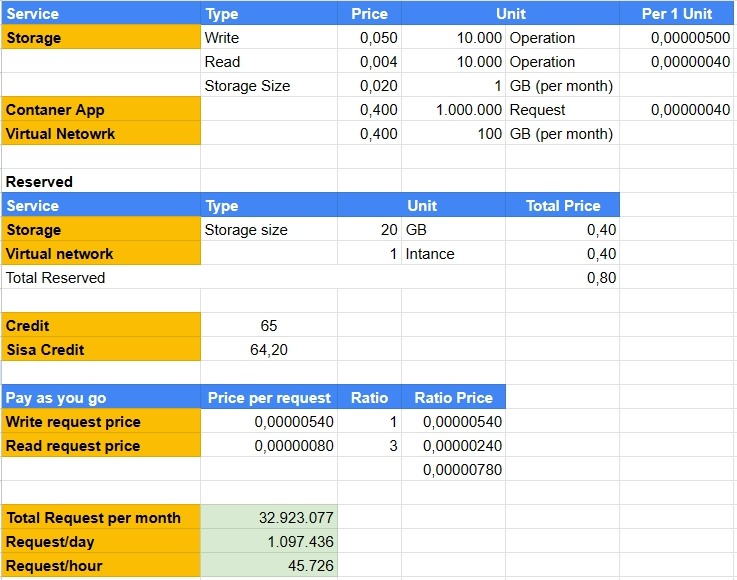
The total monthly cost came in well under our $65 budget, thanks to:
- Pay-as-you-go pricing model
- Efficient resource utilization
- Automatic scaling that only uses resources when needed
Key Learnings
This project taught me several valuable lessons about cloud architecture:
-
Container Apps are perfect for lightweight APIs: For applications with low computational needs, Container Apps provide excellent cost-to-performance ratio.
-
Auto-scaling requires careful tuning: Setting the right concurrency thresholds is crucial. Too low, and you scale too aggressively. Too high, and you might not scale when needed.
-
Spike handling is a challenge: Container Apps need time to spin up new replicas, so sudden traffic spikes can be problematic. This can be mitigated by:
- Using larger container specs
- Setting lower concurrency thresholds
- Pre-warming containers during expected peak times
-
Persistent storage is essential: Using Azure File Share for MongoDB data ensures data durability and allows for easy backups and recovery.
Conclusion
Azure Container Apps proved to be an excellent choice for this project. They provided the scalability we needed while staying well within our budget constraints. The architecture successfully handled thousands of concurrent requests with minimal failures, demonstrating that you don't always need expensive infrastructure to build robust, scalable applications.
For future projects with similar requirements—low computational needs, predictable traffic patterns, and budget constraints—Azure Container Apps should definitely be on your shortlist.
This project was completed as part of the Cloud Computing course final project at Institut Teknologi Sepuluh Nopember (ITS), in collaboration with my team members.